
How to Improve Shortwave Reception on the Malahit DSP SDR V3
Published by IWISTAO
The Malahit DSP SDR V3 is one of the most powerful portable SDR receivers available today. With wide frequency coverage, DSP filtering, and spectrum display, it can receive signals from across the world.
However many users experience weak reception or excessive noise when listening to shortwave bands.
The radio itself is rarely the problem. The key factors are antenna placement, noise environment, and correct gain settings.
In this guide we explain how to dramatically improve reception performance.

1. Understanding Shortwave Reception
Shortwave signals propagate through the ionosphere and can travel thousands of kilometers. Reception quality depends on several factors:
| Factor | Impact |
|---|---|
| Antenna efficiency | Determines how much signal is captured |
| Local noise floor | Limits the ability to detect weak signals |
| Receiver gain structure | Controls amplification and overload |
| Propagation conditions | Solar activity affects signal strength |
Among these factors, antenna placement has the largest effect.
2. Antenna Placement
The built-in telescopic antenna on the Malahit SDR is not optimal for shortwave reception. Using an external antenna can dramatically improve sensitivity. Recommended Antenna Types as below.
1. Long Wire Antenna

Or,
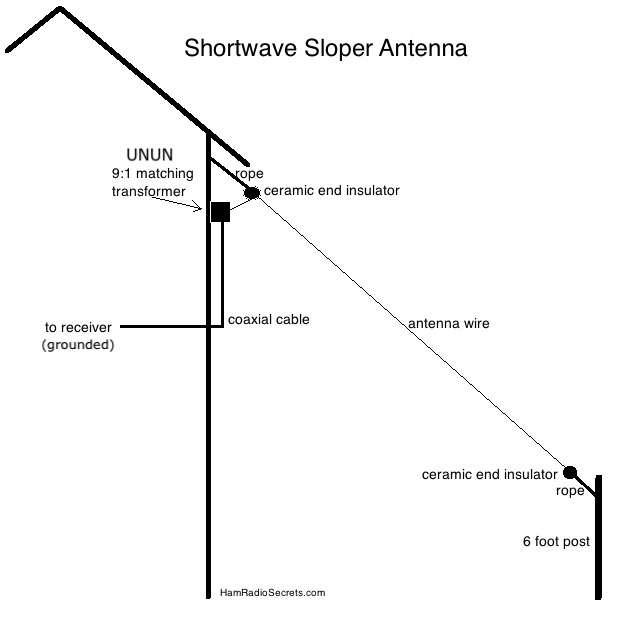

A simple 10-20 meter wire can work extremely well for shortwave listening for SW band of the radio.
Example setup:
Radio → 9:1 Unun → 15m wire antenna
Height recommendation:
3 – 10 meters above ground
2. Magnetic Loop Antennas


Magnetic loops are excellent for urban environments where electrical noise is high.
Popular models include:
- MLA-30 Active Loop
- YouLoop Passive Loop
- Airspy HF Loop
Advantages:
- Low noise pickup
- Compact size
- Works well indoors
3. Active Loop Antennas

Active loops include a built-in amplifier and can receive weak signals effectively.
However placement is critical to avoid amplifying noise.
3. Reduce Electrical Noise
Modern homes contain many devices that generate RF interference:
- LED lighting
- Switching power supplies
- Wi-Fi routers
- Computers
- Phone chargers
- Solar power inverters
These devices raise the noise floor and mask weak signals.
Practical Noise Reduction Tips
- Move the antenna away from buildings
- Operate the radio using battery power
- Install ferrite chokes on cables
- Turn off nearby switching power supplies
4. Gain Settings on Malahit SDR

Correct gain configuration is essential. Many beginners set gain too high, which causes overload and distortion. The Malahit SDR offers extensive gain and DSP control, allowing the user to optimize reception.
Key parameters include:
RF Gain
Preamp
Attenuator
AGC
Noise Reduction
Bandwidth filters
The receiver allows RF gain adjustment from 0 to 59 levels
Many beginners make this mistake, Maximum gain = best reception.This is incorrect.
Too much gain causes:
Overload
Intermodulation distortion
Increased noise floor
Recommended Baseline Settings
| Parameter | Recommended Value |
|---|---|
| RF Gain | 20 – 30 |
| Preamp | OFF |
| AGC | Slow |
| Noise Reduction | Low |
| Filter Bandwidth | 3-5 kHz |
Increase gain slowly while watching the waterfall display, adjust gradually depending on signal strength.
When to enable Preamp
Enable the preamp only when:
Using small antennas
Listening to weak signals
Operating indoors
But avoid preamp if strong broadcast stations are nearby.
When to use Attenuation
If the waterfall shows:
Strong wide signals
Distorted audio
Multiple ghost signals
Then activate 10-20 dB attenuatio
5. DSP Filtering
The Malahit SDR includes powerful digital signal processing tools.The Malahit SDR includes powerful DSP features:
Adaptive Noise Reduction
Noise Blankers
Variable Bandwidth Filters
Auto Notch Filtering
These tools dramatically improve weak signal readability.
Recommended bandwidth settings:
| Mode | Bandwidth |
|---|---|
| AM Broadcast | 5-8 kHz |
| Shortwave AM | 3-5 kHz |
| SSB | 2.2-2.8 kHz |
| CW | 300-500 Hz |
Noise reduction can greatly improve weak signals. Adaptive noise reduction helps suppress background noise and improves intelligibility
6. Example Setup
Receiver Malahit DSP SDR V3
Antenna 15m long wire
Frequency 9.585 MHz
Mode AM
Recommended settings:
RF Gain: 25
Preamp: OFF
AGC: Slow
Noise Reduction: Level 10
Bandwidth: 4kHz
Expected improvement:
Lower noise floor
Clearer audio
Stable signal
7. Advanced Tips for Serious DX Listening
Use a balun or unun
Improves impedance matching.
Example: 9:1 unun for long wire
Use coax feedline
Reduces noise pickup.
Example: RG-58 or RG-174 cable
Install antenna outdoors
Outdoor antennas outperform indoor antennas by a large margin.
Monitor propagation
Websites such as:
Solar flux reports
DX cluster networks
Shortwave schedules
help predict good listening times.
Conclusion
The Malahit DSP SDR V3 is capable of excellent performance when properly configured.
The three most important improvements are:
- Better antenna placement
- Lower electrical noise
- Correct gain settings
With these techniques the radio can receive shortwave signals from across the globe.
References
Malahit DSP User Manual
https://fms.komkon.org/Malahit/Malahit-Manual.pdfRTL-SDR Blog – Improving Malachite DSP Sensitivity
https://www.rtl-sdr.com/improving-sensitivity-on-the-malachite-dsp-via-usb-grounding/N9EWO Malahit DSP Review
https://www.qsl.net/n9ewo/malahit.htmlMalahit SDR Receiver Feature Overview
https://manuals.plus

No comments:
Post a Comment